On-premise AI: the model runs on a computer you own.
An on-premise AI system puts the language model on hardware inside your building, under your own network and your own locks, so your documents are processed where they already live rather than uploaded to a service.
What on-premise AI actually means
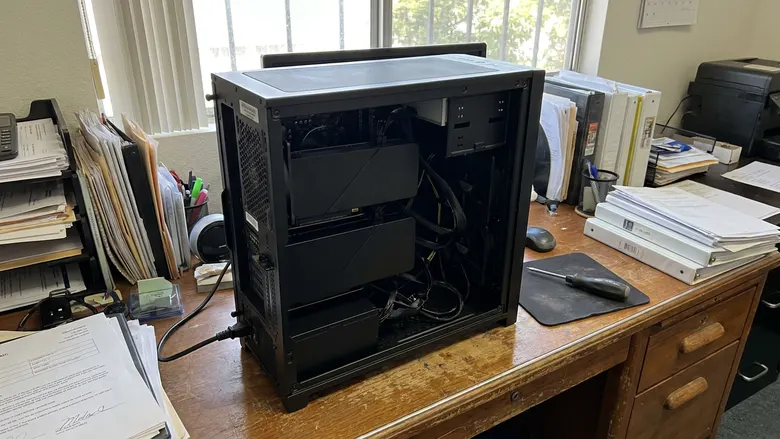
Strip the word away and it is straightforward. There is a computer. It has one or more graphics cards in it. Open-weight models are installed on that computer, and the software that reads your files, answers your questions, transcribes your calls and drafts your replies runs against those local models.
The practical consequence is about data movement. With a hosted AI service, your document is sent to a provider, processed on their infrastructure, and subject to their retention, access and training terms. With an on-premise setup, the document is read by a process on a machine you own, on a network you control.
That is the whole idea. Everything else on this page is detail about how it is built, what it is good at, and where it stops.
What an on-premise LLM looks like in a real office
Three sizes cover most businesses I work with.
- Under ten people: one graphics card, a workstation that sits under a desk
- Ten to thirty people: two cards, which is the configuration I run myself
- A group practice, a firm or a larger office: a rack server with more memory on the cards
The models are open-weight ones, chosen for capability and for license terms that suit commercial use. They handle document search, extraction, classification, transcription, summarizing and drafting over your own material. Model choice is not permanent; swapping in a stronger open model as they improve is routine maintenance rather than a rebuild.
No hardware prices on this page, deliberately. Graphics card pricing moves quickly enough that a number written here would be stale before you read it. Hardware is quoted separately at current market pricing and stays valid for 14 days.
What it is used for
- Search across the files your business already holds
- Reading scanned documents and pulling the fields out of them
- Transcribing calls and consultations, then filing the result
- Email triage and drafted replies that a person sends
- Intake, qualification and follow-up sequences
- Internal question answering over your own policies and procedures
These are the jobs where local open-weight models do well, and they also happen to be the jobs that touch the most sensitive material in a business. That overlap is the argument for this architecture.
A HIPAA-compliant LLM: what that phrase can and cannot mean
A language model is not a compliance program, so no model is HIPAA compliant on its own, whether it is hosted or installed in your server room. HIPAA obligations attach to covered entities and their business associates, and they are met through administrative, physical and technical safeguards around the whole system.
What an on-premise LLM does is make several of those safeguards simpler to satisfy and easier to describe:
- Protected health information is processed on hardware inside your facility rather than sent to an outside service
- There is one fewer vendor whose data handling, retention and subprocessors you have to evaluate
- Access control, audit logging and encryption are configured on a machine your organization controls
- The question of whether your patient data trains a third party's model does not arise for the local workflows
What it does not do is discharge your Security Rule obligations. Your organization still owes the risk analysis, the access controls, the audit logging, and encryption at rest and in transit on that box. That work is part of the audit, and it is real work rather than a checkbox.
On the business associate question, the posture here is to sign a BAA rather than argue the edges. When Akopi creates, receives, maintains or transmits protected health information on your behalf, we execute one, and maintenance access is scoped and logged.
What you own
You own the hardware, the accounts and the workflows. You control the installed model weights and configuration, subject to their licenses. If you stop working with me you keep all of it, and that is written into the contract rather than said on a call.
Worth being precise, because a lot of marketing is sloppy here: open-weight models are licensed, not sold, and the license travels with the weights. You control the copy installed on your machine and how it is configured, within whatever that model's license permits. Where a model's terms would be awkward for your use, we pick a different model at install time.
The credentials for anything the system connects to are created in your name, held in your vault, and handed over as part of the install. Nothing in the build depends on an account that only I can log into.
On-premise, private cloud and hosted AI
- On premise. Hardware in your building. Data processed locally. You hold the keys and the physical access. Capital cost up front, no per-token bill for local work.
- Private cloud. Dedicated infrastructure at a provider. Better isolation than a shared service, but still a vendor holding your data and a contract to read carefully.
- Hosted AI service. Fastest to start, strongest models, and the option where the data-handling questions are hardest to answer for regulated or confidential material.
These are not mutually exclusive, and the practical builds are usually mixed. The rule I work to is that anything with a patient, a client file, a financial record or a cost book in it is processed locally, and a frontier model is only used for a task that genuinely needs that level of reasoning, on your own account, with the minimum approved context for that task, under a written data classification.
The honest limits
Three things a vendor would rather not tell you.
Local models are not the strongest models. For routine reading, extraction, classification and drafting over your own material, they are entirely adequate and often indistinguishable in practice. For the hardest reasoning, a frontier model is still better, which is why the architecture routes that one task out under a written rule rather than pretending the gap does not exist.
Somebody has to maintain the box. Models need refreshing, the operating system needs patching, disks fill up, and a workflow that broke quietly is worse than one that never existed. That is what the operations retainer is for, and if you would rather handle it in house, the install is documented so your own IT person can.
On-premise is not automatically more secure. A neglected server in a closet with one shared password is worse than a well-run cloud service. The security floor on every install exists for this reason: multi-factor, least privilege, credentials in your name, a secrets vault, audit logs, separated development and production credentials.
Who this suits, and who it does not
It tends to fit businesses that hold other people's sensitive material and have an owner who can sign: private-pay medical practices, healthcare staffing agencies and nurse registries, small and mid-size law firms, and commercial contractors whose cost book is their edge.
It tends not to fit if you are looking for a chatbot on your website and nothing else, if the data you want processed is already public, or if nobody in the organization will own the system after it is installed. In those cases a hosted tool is the cheaper answer and I will say so on the call.
How it goes
- Twenty minute call, free.
- The audit: half a day in your business, the workflow map, the data and compliance check, and one thing installed that same week.
- The proposal, handed to you inside the audit readout.
- The install, four to six weeks, then go live.
The Operator's AI Audit: $3,500. Credited in full against the Private AI System if you go ahead within 30 days.
Who this is for
Trades and home services get their own page too.
The demo
Come watch it run, then watch me unplug the network cable and run it again. That is the shortest honest explanation of on-premise AI I have found.